
Introduction
Running a WordPress website without a backup system is risky. Your website can crash at any time due to updates, hacking attempts, or server issues. If you don’t have a backup, all your important data could be lost.
In this guide, you will learn about the best WordPress backup plugins that help you protect your website and restore it whenever needed.
Why Backup is Important for WordPress Website
A backup is a complete copy of your website, including files, databases, images, and content. It acts as a safety net for your website.
Here’s why backups are essential:
- Protects your website from data loss
- Helps recover from hacking or malware
- Allows quick restoration after errors
- Keeps your business running without downtime
Without a backup, even a small issue can cause major damage.
What to Look for in a Backup Plugin
Not all backup plugins offer the same features. Choose the right one can make a big different.
Here are key features you should look for:
- Automatic backups (daily or weekly)
- One-click restore option
- Cloud storage integration (Google Drive, Dropbox)
- Easy setup for beginners
- Lightweight performance
A good backup plugin should be simple, reliable, and fast.
Top WordPress Backup Plugins (Best Options)
UpdraftPlus – Most Popular Backup Plugin
UpdraftPlus is one of the most widely used backup plugins for WordPress.
Key Features:
Automatic scheduled backups
Supports cloud storage
Easy restore system
Free version available
It is perfect for beginners and works smoothly with daily backup routines.
Jetpack Backup – Real-Time Protection
Jetpack Backup offers real-time backup, making it ideal for websites that update frequently.
Key Features:
Real-time backup system
Secure cloud storage
Activity log tracking
Quick restore option
This plugin is great for business websites that need constant protection.
BackupBuddy – Premium Backup Solution
BackupBuddy is a premium plugin designed for advanced users and professionals.
Key Features:
Complete website backup
Scheduled backups
Malware scanning
Website migration support
It is a powerful tool for managing multiple websites.
All-in-One WP Migration – Easy Backup & Migration
This plugin is simple and beginner-friendly.
Key Features:
One-click backup
Easy migration process
No technical knowledge required
Fast performance
It is best for users who want a simple and quick solution.
How to Choose the Right Backup Plugin
Choosing the right plugin depends on your needs:
For Beginners:
UpdraftPlus is the best choice because it is easy to use and free.
For Business Websites:
Jetpack Backup is ideal due to its real-time protection.
For Developers:
BackupBuddy offers advanced features and flexibility.
How to Set Up a Backup Plugin (Step-by-Step)
Install the Plugin
Open your WordPress dashboard and navigate to the Plugins section, then click on “Add New.”
Configure Settings
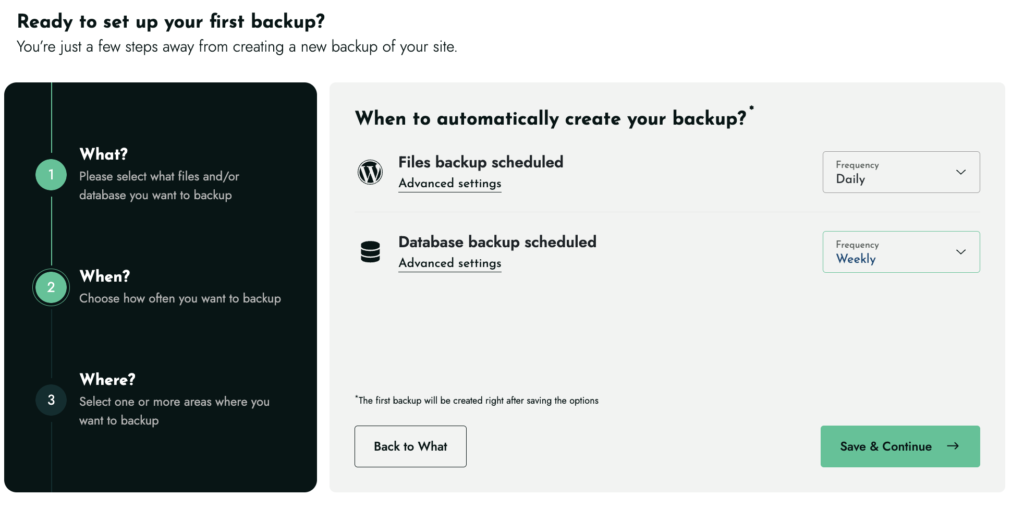
Set your backup schedule (daily or weekly)
Choose storage location (Google Drive is recommended)
Run Your First Backup
Click on “Backup Now”
Wait until the process is complete
Best Practices for WordPress Backup
Take Regular Backups
Set a schedule for automatic backups
Use Multiple Storage Locations
Do not rely on a single storage option
Test Your Backups
Always check if your backup can be restored
Backup Before Updates
Always create a backup before updating plugins or themes
Common Mistakes to Avoid
Not Setting a Backup Schedule
Manual backups are unreliable
Keeping Only One Backup Copy
Always keep multiple backups
Not Testing Backups
A backup is useless if it cannot be restored
FAQs
1. What is the best free WordPress backup plugin?
UpdraftPlus is the most popular free backup plugin with powerful features.
2. Can I backup my website without a plugin?
Yes, but it is complex and time-consuming. Plugins make it easy.
3. Where should I store my backups?
Cloud storage like Google Drive or Dropbox is the best option.
4. Is a backup plugin necessary for small websites?
Yes, every website needs a backup regardless of size.