
Fix WordPress Not Sending Emails (Step-by-Step)
If your WordPress website is not sending emails, you are not alone. This is one of the most common issues faced by website owners. From contact form submissions to password reset emails, many important notifications depend on proper email delivery.
When emails stop working, it can affect user experience, lead generation, and even sales. In this guide, you will learn why this problem happens and how to fix it step by step.
Why WordPress Emails Stop Working
WordPress uses a built-in PHP mail function to send emails. Unfortunately, many hosting providers block or limit this function to prevent spam.
Here are the most common reasons:
- Poor server configuration
- Emails marked as spam
- Missing SMTP authentication
- Faulty plugins or themes
- Incorrect “From” email address
Understanding the cause helps you fix the issue faster.
1: Check Your Spam Folder

Before making technical changes, check your spam or junk folder. Sometimes emails are delivered but filtered by email providers like Gmail or Outlook.
Also, mark those emails as “Not Spam” to improve future delivery.
2: Verify Your Email Settings
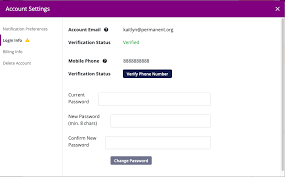
Make sure your WordPress admin email is correct:
- Go to Settings → General
- Check “Administration Email Address”
- Ensure it is valid and active
A wrong email address can stop all notifications.
3: Install an SMTP Plugin (Most Effective Fix)

One of the best solutions is using SMTP instead of PHP mail.
SMTP (Simple Mail Transfer Protocol) ensures emails are properly authenticated and delivered.
Recommended plugins:
- WP Mail SMTP
- Easy WP SMTP
After installation:
- Configure your email provider (Gmail, Outlook, or custom SMTP)
- Enter SMTP host, port, username, and password
- Enable authentication
This method significantly improves email delivery rates.
4: Use a Professional Email Address

Avoid using generic emails like:
- wordpress@yourdomain.com (without setup)
Instead, use a real business email like:
- info@yourdomain.com
Professional email addresses increase trust and reduce spam filtering.
5: Test Email Delivery

After setup, always test your email system.
Most SMTP plugins offer a “Send Test Email” feature.
If the test fails:
- Recheck credentials
- Verify SMTP port (usually 465 or 587)
- Ensure SSL/TLS is enabled
6: Check Hosting Restrictions
Some hosting providers block outgoing mail to reduce spam abuse.
If emails still don’t work:
- Contact your hosting support
- Ask if PHP mail or SMTP ports are blocked
- Request whitelist for email sending
7: Disable Conflicting Plugins

Sometimes plugins interfere with email functionality.
To check:
- Deactivate all plugins
- Test email again
- Reactivate one by one
This helps identify the problematic plugin.
8: Check WordPress Debug Logs
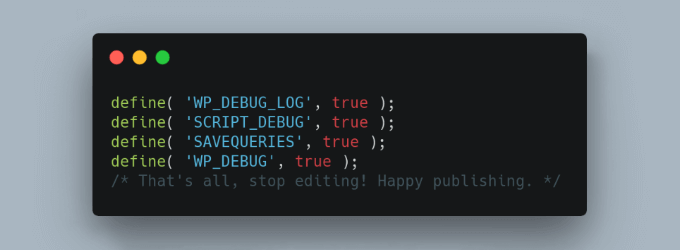
Enable debugging to find hidden errors:
Add this in wp-config.php:
- define(‘WP_DEBUG’, true);
Then check error logs for email-related issues.
9: Use Transactional Email Services
For better reliability, use services like:
- SendGrid
- Mailgun
- Amazon SES
These services are built for high email deliverability and are ideal for business websites.
Common Mistakes to Avoid
- Using default PHP mail without SMTP
- Wrong “From” email address
- Not verifying domain DNS records
- Ignoring spam filtering issues
Final Thoughts
Fixing WordPress email issues is not difficult once you understand the cause. In most cases, setting up SMTP correctly solves the problem permanently.
If your website depends on email communication, using a reliable SMTP service is not optional—it is essential.
FAQs
1. Why is WordPress not sending emails?
Usually due to server restrictions, missing SMTP setup, or incorrect email configuration.
2. What is SMTP in WordPress?
SMTP is a secure method used to send emails with proper authentication, improving delivery rates.
3. Is WP Mail SMTP free?
Yes, it has a free version that works for most basic websites.
4. Can hosting affect email delivery?
Yes, some hosting providers block PHP mail or restrict outgoing email traffic.
5. What is the best email service for WordPress?
SendGrid, Mailgun, and Amazon SES are highly reliable options.