
Introduction
A slow WordPress website is one of the biggest reasons behind poor user experience and low Google rankings. If your website takes more than a few seconds to load, visitors will leave instantly, increasing your bounce rate and reducing conversions.
In this complete guide, you will learn how to fix WordPress website slow speed issues and optimize your site for better performance, faster loading, and improved SEO results.
Why Website Speed is Important
Website speed is not just a technical factor — it directly impacts your business success.
A fast website helps you:
- Improve Google rankings
- Increase user engagement
- Reduce bounce rate
- Boost conversions and sales
Google also uses page speed as a ranking factor, so a slow website can seriously affect your SEO performance.
Common Reasons for Slow WordPress Website
Before fixing speed issues, you must understand the root causes:
Heavy Themes
Some WordPress themes are poorly coded and slow down your website.
Unoptimized Images
Large image files increase loading time.
Too Many Plugins
Excess plugins can slow down performance.
Poor Hosting
Cheap hosting services often cause slow response time.
No Caching System
Without caching, every page loads from scratch.
How to Fix WordPress Website Slow Speed
Now let’s look at practical solutions to improve your website speed.
Choose a Lightweight Theme
Your theme plays a major role in website performance.
Best Practices:
- Use lightweight themes like Astra or GeneratePress
- Avoid heavy animations and unnecessary scripts
- Keep design simple and clean
A fast theme reduces load time instantly.
Optimize Images Properly
Images are usually the biggest reason for slow websites.
How to fix:
- Compress images before uploading
- Use WebP format
- Install image optimization plugins
Optimized images can reduce loading time by up to 50%.
Use Caching Plugin
Caching helps store static versions of your website.
Benefits:
- Faster page loading
- Reduced server load
- Better user experience
Popular caching plugins include:
- WP Rocket
- LiteSpeed Cache
- W3 Total Cache
Use a Fast Hosting Provider
Hosting is the backbone of your website.
Tips:
- Avoid cheap shared hosting
- Use SSD-based hosting
- Choose providers with good uptime
Good hosting can dramatically improve speed.
Minify CSS, HTML, and JavaScript
Minification removes unnecessary code from your website files.
Benefits:
- Smaller file size
- Faster loading speed
- Better performance score
Most caching plugins include this feature.
Remove Unnecessary Plugins
Too many plugins slow down your website.
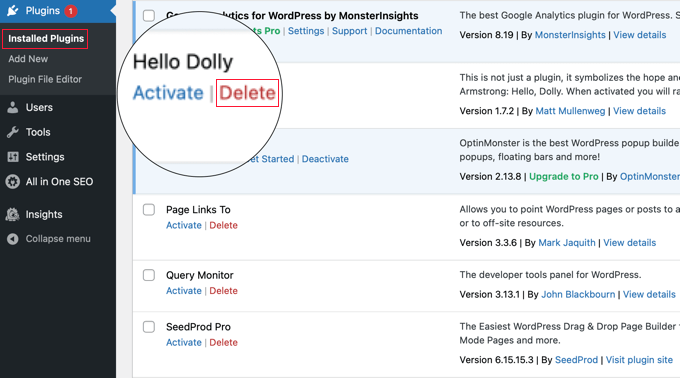
Best practice:
- Delete unused plugins
- Use multi-function plugins instead
- Keep only essential tools
Enable Lazy Loading
Images are loading gradually as the user scrolls through the page.
Benefits:
- Faster initial page load
- Better performance score
- Improved mobile experience
Use CDN (Content Delivery Network)
A CDN distributes your content across global servers.
Benefits:
- Faster loading worldwide
- Reduced server load
- Better stability
Popular CDN services include Cloudflare.
Optimize WordPress Database
Over time, databases become heavy.
Fix:
- Remove spam comments
- Delete post revisions
- Use database optimization plugins
Reduce External Scripts
External scripts like ads and tracking codes can slow your site.
Tip:
- Limit third-party scripts
- Load scripts asynchronously
Final Optimization Checklist
Before publishing your website changes, check:
- Page speed improved
- Images optimized
- Caching enabled
- Plugins reduced
- Hosting stable
FAQs
Why is my WordPress website so slow?
Mostly due to heavy themes, unoptimized images, poor hosting, or too many plugins.
Which WordPress plugin is most effective for improving website speed?
WP Rocket and LiteSpeed Cache are highly recommended.
Does website speed affect SEO?
Google considers page speed an important factor for ranking websites.
How can I check website speed?
You can use tools such as Google PageSpeed Insights or GTmetrix to check performance.
Can hosting affect website speed?
Yes, low-quality hosting can significantly slow down your website.