
Artificial intelligence has changed the way people write, code, and manage daily tasks. Whether you are a blogger, student, marketer, business owner, or software developer, AI tools can save time while improving productivity. The best AI writing tools do much more than generate text. They can help with brainstorming ideas, editing content, creating code, answering questions, and automating repetitive work.
With so many AI platforms available today, choosing the right one can be difficult. Every tool has different strengths, pricing, and features. Some are designed for content writing, while others focus on programming, research, or team collaboration.
This guide covers ten of the most popular AI tools available today and explains what makes each one unique.
Why Use AI Writing Tools?
AI writing tools help users complete work faster without sacrificing quality. Instead of spending hours researching or drafting content, you can use AI to organize ideas, improve grammar, rewrite paragraphs, and generate creative suggestions.
Some of the biggest advantages include:
- Faster content creation
- Better grammar and readability
- Improved brainstorming
- Coding assistance
- Time-saving automation
- Increased productivity
- Better collaboration
1. ChatGPT

Among today’s AI-powered assistants, ChatGPT has earned a strong reputation for helping users create content, solve problems, and improve productivity. It can write articles, answer questions, generate emails, summarize documents, and assist with coding projects.
It supports a wide range of tasks including marketing content, academic writing, customer support, and creative storytelling. Because of its flexibility, many professionals use it as their primary AI assistant.
Best for:
- Blog writing
- Content planning
- Email drafting
- Coding help
- Brainstorming ideas
2. GitHub Copilot
GitHub Copilot is designed specifically for software developers. It works directly inside popular code editors and provides intelligent code suggestions while you type.
Instead of searching online for syntax, developers can generate complete functions, fix bugs, and speed up software development.
Best for:
- Code generation
- Programming assistance
- Debugging
- Learning new programming languages
3. Claude AI
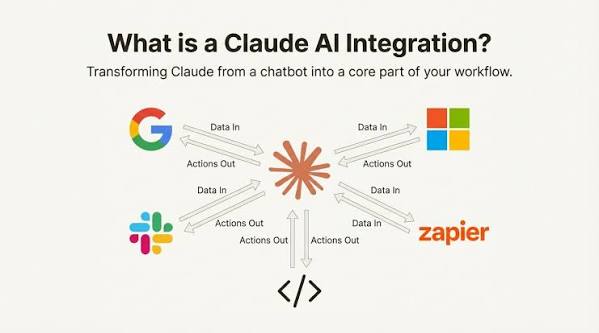
Claude AI focuses on natural conversations, document analysis, and long-form writing. It performs well when handling lengthy reports, research papers, and business documents.
Many users appreciate its detailed responses and organized writing style.
Best for:
- Long documents
- Research
- Business writing
- Summarization
4. Google Gemini
Google Gemini combines AI capabilities with Google’s ecosystem. It helps users write documents, answer questions, generate ideas, and work with different types of information.
It also integrates well with several Google productivity tools.
Best for:
- Productivity
- Research
- Google Workspace users
- Everyday writing
5. Cursor AI
Cursor AI is built for developers who want an AI-powered coding experience. It understands existing codebases and helps users write, edit, and improve software more efficiently.
Its smart editing features reduce repetitive coding tasks.
Best for:
- Software development
- AI code editing
- Project management
- Programming productivity
6. Windsurf
Windsurf is another AI-powered coding assistant designed to simplify software development. It helps developers understand projects, generate code, and automate programming workflows.
Its interface is designed to improve developer efficiency.
Best for:
- AI programming
- Code editing
- Project automation
- Developer workflows
7. Amazon Q Developer

Amazon Q Developer is built for cloud developers working with AWS services. It provides coding assistance, security recommendations, and cloud development support.
Businesses using AWS can improve development speed through intelligent automation.
Best for:
- AWS development
- Cloud applications
- Code suggestions
- Enterprise development
8. Replit AI
Replit AI helps users build applications directly from the browser. It supports coding, debugging, explanations, and project generation without requiring complex software installation.
It is especially useful for beginners learning programming.
Best for:
- Learning programming
- Web applications
- Quick prototypes
- Browser-based development
9. Tabnine

Tabnine is an AI coding assistant that predicts code based on your programming style. It supports multiple programming languages and integrates with popular IDEs.
Organizations often choose Tabnine because it supports private deployments and secure development environments.
Best for:
- Secure coding
- Team development
- Code completion
- Enterprise software
10. Bolt.new
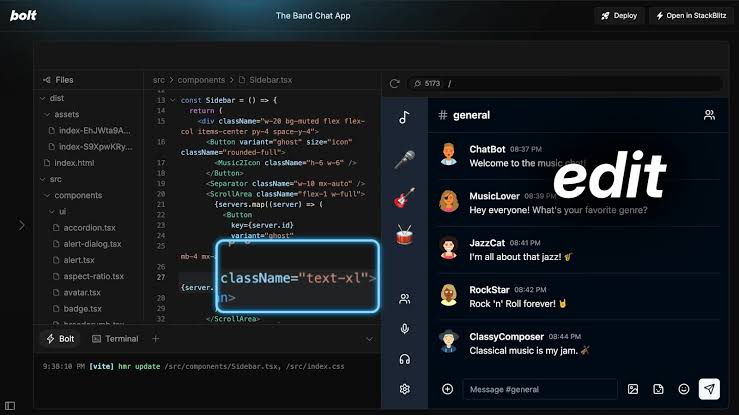
Bolt.new allows users to build web applications using AI with minimal manual coding. Users can describe what they need, and the platform quickly generates working applications.
It is an excellent choice for rapid prototyping and modern web development.
Best for:
- Web app creation
- AI development
- Rapid prototyping
- Startup projects
Choosing an AI Writing Solution That Matches Your Goals
Before selecting an AI assistant, consider your primary goals.
If your work focuses on articles, marketing, or business writing, choose a platform that offers strong language generation.
If you develop software, prioritize coding assistants that integrate with your development environment.
Important factors include:
- Accuracy
- Ease of use
- Integration options
- Pricing
- Privacy
- Speed
- Customization
- Team collaboration
Testing multiple tools is often the best way to determine which one fits your workflow.
Final Thoughts
AI technology continues to improve at an impressive pace. Modern AI assistants are no longer limited to generating text. They now support coding, research, project planning, document analysis, and business productivity.
AI writing tools depend on your specification needs. ChatGPT provides excellent all-around performance, GitHub Copilot and Cursor AI are ideal for developers, Claude AI excels with long documents, Google Gemini integrates well with Google services, and toolsReplit AI, Tabnine, Amazon Q Developer, Windsurf, and Bolt.new are built to support different development tasks, allowing users to choose the platform that best fits their workflow.
Instead of relying on a single solution, many professionals combine multiple AI tools to create a faster and more efficient workflow. As AI continues to evolve, these platforms will become even more capable, helping individuals and businesses produce high-quality work with greater efficiency.
Frequently Asked Questions
1. What is a good AI writing platform for first-time users?
ChatGPT and Google Gemini are excellent choices because they are easy to use and support many writing and productivity tasks.
2. Can AI writing tools improve SEO content?
Yes. They can help organize articles, generate ideas, improve readability, and create structured content, but human review is still important for accuracy and quality.
3. Which AI tool is best for programming?
GitHub Copilot, Cursor AI, Windsurf, Tabnine, Amazon Q Developer, and Replit AI are among the strongest options for coding assistance.
4. Are AI writing tools suitable for businesses?
Yes. Many businesses use AI tools to create marketing content, write emails, prepare reports, automate documentation, and improve team productivity.
5. Should I use more than one AI tool?
Using multiple AI tools can be beneficial because each platform specializes in different tasks such as writing, coding, research, or collaboration. Combining them often produces better results than relying on a single tool.