

Managing a loan becomes easier when you understand how much you need to pay each month and how your outstanding balance changes over time. Whether you are planning to purchase a home, finance a vehicle, or borrow money for personal expenses, knowing the total repayment amount can help you make better financial decisions.
An amortization calculator helps borrowers determine their scheduled loan installments and understand how much of each payment goes toward the outstanding balance and interest charges. It can also generate a repayment schedule, allowing borrowers to see how much they owe after every payment.
Instead of calculating everything manually, you can enter basic loan information, such as the borrowed amount, interest rate, and repayment period, to get an estimated payment breakdown. This makes financial planning more convenient for individuals, families, and business owners.
In this guide, you will learn how an amortization calculator works, how to use it, how monthly payments are calculated, and why a loan repayment schedule is important.
1. What Is an Amortization Calculator?

An amortization calculator is an online financial tool that estimates loan payments over a specific repayment period. It explains how much of each payment goes toward reducing the original borrowed amount and how much is used to cover interest.
Most installment loans require borrowers to make regular payments, often monthly. Although the payment amount may remain the same throughout a fixed-rate loan, the principal and interest portions usually change over time.
At the beginning of the repayment period, a larger part of each payment generally goes toward interest. As the outstanding balance decreases, the interest portion becomes smaller, while more money is applied to the principal.
For example, imagine borrowing $20,000 at a fixed annual interest rate with a repayment period of five years. This tool calculates your expected monthly payments, overall interest charges, and the amount still owed on your loan.
This information helps you understand the financial commitment before accepting a loan.
2. How Does an Amortization Calculator Work?
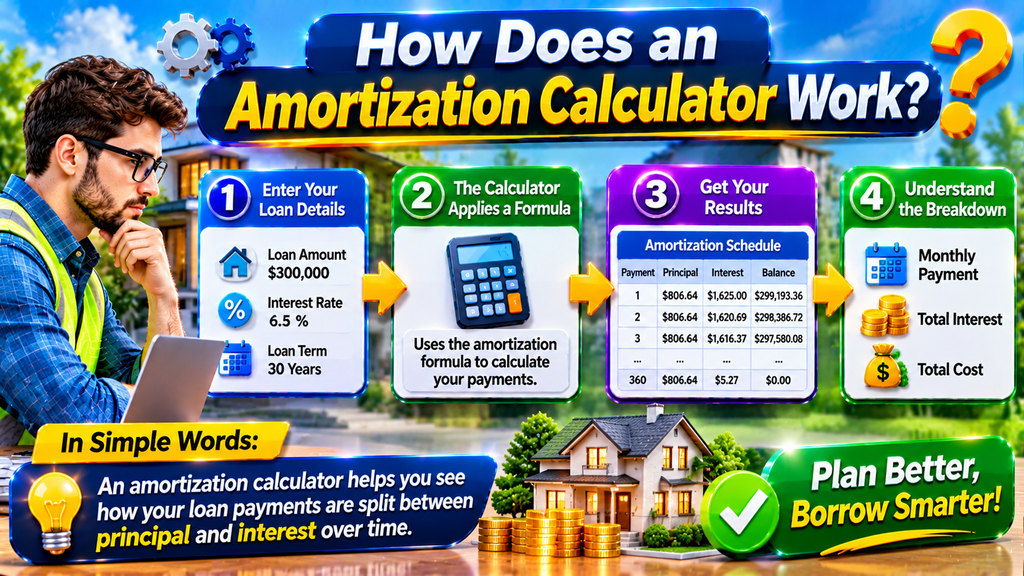
An amortization calculator determines your estimated installment amount based on the borrowed sum, applicable interest rate, and loan term. It uses a standard calculation method to work out the payments needed to clear the debt within the chosen timeframe.
To use a typical calculator, you usually need to provide these details:
- Loan Amount: The total sum you intend to receive from the lender.
- Annual Interest Rate: The yearly percentage charged by the lender.
- Loan Term: The total time allowed to repay the borrowed money.
- Payment Frequency: How often you plan to make payments, such as monthly or biweekly.
After entering these values, the calculator estimates your regular payment and creates an amortization schedule.
The schedule normally includes the payment number, payment amount, interest portion, principal portion, and remaining balance.
Some advanced calculators also allow additional payments, different payment frequencies, and extra fees. However, results depend on the features and assumptions used by each tool.
Keep in mind that calculator estimates may not include taxes, insurance, lender fees, or other borrowing costs unless those expenses are entered separately.
3. How to Calculate Monthly Loan Payments

Monthly loan payments can be calculated using a standard amortization formula. The calculation uses the borrowed principal, monthly interest percentage, and overall number of installments to determine the payment amount.
The commonly used formula is:
M = P × [r(1 + r)ⁿ] / [(1 + r)ⁿ − 1]
Where:
- M: Monthly loan payment
- P: Original loan principal
- r: The monthly interest rate written in decimal form.
- n: Total number of monthly payments
For example, if your annual interest rate is 6%, the monthly interest rate is generally calculated by dividing 6% by 12, giving 0.5% or 0.005.
If you borrow $10,000 for three years, the repayment period contains 36 monthly installments.
By entering these values into the formula, you can estimate the monthly payment. An online amortization calculator performs this calculation automatically and reduces the possibility of manual calculation errors.
Important: The formula assumes a standard fixed-rate installment loan with equal payments and regular compounding periods. Actual lender calculations may differ because of fees, payment dates, rounding rules, and loan conditions.
4. What Is a Loan Amortization Schedule?

A loan amortization schedule provides a breakdown of the repayment process, showing how much of each installment goes toward reducing the principal and covering interest charges.
This schedule is useful because the same monthly installment does not necessarily contain the same principal and interest amounts throughout the loan.
For example, a simplified schedule might look like this:
| Payment | Monthly Payment | Interest | Principal |
| 1 | $304.22 | $50.00 | $254.22 |
| 2 | $304.22 | $48.73 | $255.49 |
| 3 | $304.22 | $47.45 | $256.77 |
Illustrative figures only; actual amounts depend on the loan terms.
This demonstrates how interest costs gradually decline as a larger share of each payment is allocated toward the loan’s principal.This happens because interest is generally calculated on the remaining loan balance.
An amortization schedule can help borrowers:
- Track their repayment progress.
- Understand the total interest cost.
- Identify how much principal remains.
- Compare different loan durations.
- Evaluate the possible impact of additional payments.
Reviewing the schedule regularly can also help you stay organized and avoid missing payment deadlines.
5. Benefits of Using an Amortization Calculator

An amortization calculator provides several advantages for people who want to manage loans more effectively.
Better Budget Planning: Knowing your estimated monthly payment makes it easier to organize household expenses and determine whether a loan fits your budget.
Interest Cost Awareness: The calculator helps you estimate how much interest you may pay over the entire repayment period. This allows you to compare borrowing options more carefully.
Loan Comparison: You can enter different interest rates, loan amounts, and repayment terms to see how they affect your monthly installments.
Understanding Principal Reduction: The payment schedule explains how your outstanding balance decreases over time.
Saving Time: Manual loan calculations can be complicated. An online tool produces estimates within seconds.
Extra Payment Planning: Some calculators allow you to test additional payments and estimate how they may reduce the repayment period or overall interest.
These benefits make an amortization calculator a practical resource for anyone considering an installment loan.
6. Different Types of Loans You Can Calculate

Amortization calculators can be useful for several types of installment loans. The exact results depend on the repayment structure and calculator features.
Mortgage Loans: Homebuyers can estimate monthly mortgage payments and understand how much interest they may pay during the loan term.
Auto Loans: People financing cars can compare repayment periods and calculate estimated monthly vehicle payments.
Personal Loans: Borrowers can evaluate installment payments for personal expenses, home improvements, or other financial needs.
Business Loans: Small business owners can estimate financing costs and include expected loan payments in their business budgets.
Student Loans: Certain student loans use installment repayment structures that can be estimated with an amortization calculator. However, income-based plans, deferment, and special repayment rules may require different tools.
Before relying on a result, confirm that the calculator supports the type of loan you are evaluating.
7. Tips for Getting Accurate Results From an Amortization Calculator

The accuracy of your estimate depends on the information you enter. Incorrect loan details can produce misleading results, so it is important to review every value carefully.
Consider these practical tips:
- Enter the Correct Loan Amount: Use the actual amount you expect to borrow rather than the property’s full purchase price or another unrelated figure.
- Check the Interest Rate: Confirm whether the rate is annual, monthly, fixed, or variable.
- Select the Correct Loan Term: Enter the repayment duration in the correct unit, such as years or months.
- Understand Payment Frequency: Make sure the calculator uses the same payment schedule as your lender.
- Include Additional Costs: If the calculator supports them, add applicable fees, insurance, or taxes.
- Compare Multiple Scenarios: Test different repayment periods and interest rates before choosing a loan.
- Review the Final Schedule: Check the total interest, payment amount, and remaining balance rather than focusing only on the monthly installment.
A calculator provides an estimate, not a guaranteed loan offer. Always compare its results with the lender’s official repayment information.
8. Amortization Calculator vs. Simple Interest Calculator

An amortization calculator and a simple interest calculator both help estimate borrowing costs, but they serve different purposes.
A simple interest calculator generally determines interest using the principal amount, interest rate, and time period. It is useful for straightforward interest calculations.
An amortization calculator provides a more detailed picture of installment-based borrowing. It estimates regular payments and shows how each payment reduces the outstanding balance while covering interest.
For example, if you are evaluating a standard fixed-rate mortgage, an amortization calculator is generally more suitable because it provides a complete repayment schedule.
A simple interest calculator may be sufficient when you only need to estimate interest on a basic borrowing arrangement.
Choosing the right tool depends on the loan structure and the information you want to understand.
Explore more guides on DevFreeHub:
These guides cover website tools and WordPress management for readers interested in other digital resources.
Conclusion
An amortization calculator is a practical tool for understanding loan payments, interest expenses, and repayment progress. It helps borrowers estimate monthly installments, review principal reduction, and see how their outstanding balance changes over time.
Whether you are planning to finance a home, purchase a vehicle, or apply for a personal loan, using an amortization calculator can make financial planning easier. It also allows you to compare different interest rates and repayment periods before making a borrowing decision.
For better results, enter accurate loan details, review the complete amortization schedule, and compare your estimates with the lender’s official terms. Remember that the calculator provides an estimate rather than a guarantee of the final amount you will pay.
By understanding how loan amortization works, you can make more informed borrowing decisions and manage your repayments with greater confidence.
Frequently Asked Questions (FAQs)
1. What is an amortization calculator used for?
An amortization calculator estimates regular loan payments and shows how each installment is divided between principal and interest. It can also display the remaining loan balance throughout the repayment period.
2. How do I calculate my monthly loan payment?
Enter the loan amount, annual interest rate, and repayment term into an amortization calculator. The tool uses a standard payment formula to estimate your monthly installment.
3. Does an amortization calculator show total interest?
Yes. Most standard amortization calculators estimate the total interest payable over the full loan term, along with the principal repayment and total payment amount.
4. Why does the interest portion decrease over time?
Interest is generally calculated using the outstanding loan balance. As you repay the principal, the remaining balance becomes smaller, which usually reduces the interest charged in later payment periods.
5. Can I use an amortization calculator for a mortgage?
Yes. It is commonly used to estimate mortgage payments, principal reduction, total interest, and the remaining home loan balance. Taxes and insurance may need to be calculated separately.
6. Can an amortization calculator calculate car loan payments?
Yes. Enter the vehicle loan amount, interest rate, and repayment period to estimate your regular car payments. Remember to account for additional charges that may not be included automatically.
7. Does making extra payments reduce loan interest?
Extra principal payments can reduce the outstanding balance and may lower the total interest paid. Their effect depends on your loan agreement, payment timing, and any prepayment penalties.
8. What information do I need to use an amortization calculator?
You generally need the original loan amount, annual interest rate, repayment duration, and payment frequency. Some calculators also request extra payments or additional borrowing costs.
9. Is an amortization calculator accurate?
It can provide reliable estimates when the entered information and calculation assumptions match the loan terms. However, the lender’s official schedule may differ because of fees, rounding, payment dates, or other conditions.
10. What is the difference between principal and interest?
Principal is the original borrowed amount that you must repay. Interest is the cost charged by the lender for borrowing that money. A regular installment payment may include both amounts.