
Introduction
If you have created a WordPress website but are not getting traffic, the problem is most likely SEO. Search Engine Optimization (SEO) helps your website appear in Google search results and attract visitors without paid ads.
This beginner-friendly guide will explain everything you need to know about WordPress SEO optimization, including why it matters and how to do it step by step.
What is WordPress SEO Optimization?
WordPress SEO optimization is the process of improving your website so that search engines like Google can easily understand and rank it.
It includes:
- Optimizing content
- Improving website speed
- Using the right keywords
- Fixing technical issues
The better your SEO, the higher your chances of ranking on Google.
Why SEO Optimization is Important
Many beginners ignore SEO, but it is one of the most important parts of building a successful website.
1. Increase Organic Traffic
SEO helps your website appear in search results, bringing free visitors.
2. Better User Experience
Websites that are properly optimized perform faster and offer a smoother browsing experience for users.
3. Higher Google Rankings
Good SEO improves your chances of appearing on the first page.
4. Long-Term Results
Unlike ads, SEO gives long-lasting traffic.
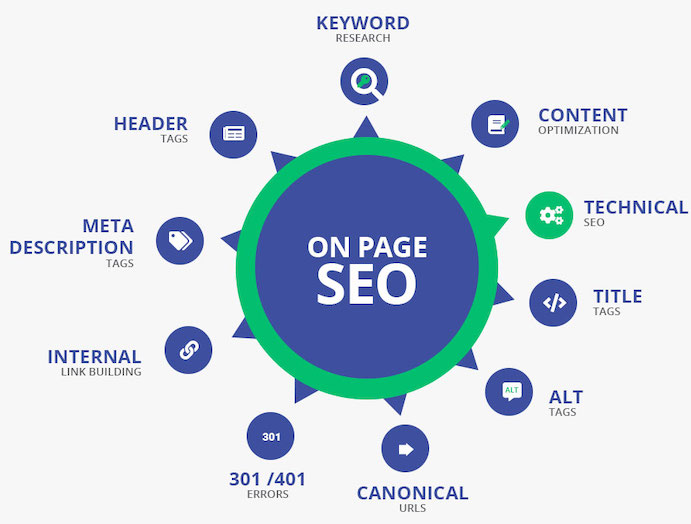
Step-by-Step WordPress SEO Optimization Guide
1. Choose a SEO-Friendly Theme
Your theme affects your website speed and structure. Always choose a lightweight and clean-coded theme.
Tip: Avoid heavy themes with too many features.
2. Install an SEO Plugin
SEO plugins make optimization easy, even for beginners.
Popular options:
- Rank Math
- Yoast SEO
These tools help you:
- Add meta titles and descriptions
- Optimize keywords
- Generate sitemaps
3. Do Proper Keyword Research
Keywords are what people search on Google.
How to Find Keywords
- Use low competition keywords
- Focus on long-tail keywords
- Check search intent
Example:
Instead of “SEO”, use
“WordPress SEO optimization for beginners”
4. Optimize Your Content
Content is the most important part of SEO.
Content Optimization Tips
- Use your focus keyword naturally
- Write clear and helpful content
- Add headings (H1, H2, H3)
- Keep paragraphs short
- Avoid keyword stuffing
5. Improve Website Speed
A slow website can hurt your rankings.
Speed Optimization Tips
- Use a fast hosting provider
- Compress images
- Use caching plugins
- Minimize unnecessary plugins
6. Make Your Website Mobile-Friendly
Most users visit websites on mobile devices.
Make sure your website:
- Adjusts to all screen sizes
- Loads quickly on mobile
- Has easy navigation
7. Optimize Images
Images can slow down your website if not optimized.
Image SEO Tips
- Use compressed images
- Add ALT text
- Use descriptive file names
8. Use Internal Linking
Internal links connect your pages and help search engines understand your site.
Benefits
- Improves SEO
- Keeps users longer on your site
- Helps Google crawl pages
9. Create SEO-Friendly URLs
Your page link should be clean, clear, and easy for visitors to understand at first glance.
Good Example:
yourwebsite.com/wordpress-seo-guide
Bad Example:
yourwebsite.com/p=123
10. Add Meta Title and Description
Meta tags help search engines understand your page.
Tips:
- Keep title under 60 characters
- Add keyword in title
- Write attractive description
11. Submit Your Website to Google
To get indexed faster, submit your website to Google Search Console.
Steps:
- Verify your site
- Submit sitemap
- Monitor performance
12. Build Backlinks
Backlinks are when other websites point or refer their users to your site through clickable links.
Why Important?
- Increase authority
- Improve ranking
- Build trust
Common SEO Mistakes to Avoid
Many beginners make these mistakes:
- Ignoring keyword research
- Using too many plugins
- Writing duplicate content
- Not optimizing images
- Slow website speed
Fixing these common errors can help you see better results in a shorter time.
Best Low Competition Keywords to Target
You can use these keywords for better ranking:
- WordPress SEO guide for beginners
- how to optimize WordPress website SEO
- beginner SEO tips WordPress
- improve WordPress ranking fast
- simple SEO techniques for WordPress
Pro Tips for Faster Ranking
- Focus on quality content
- Update old posts regularly
- Use simple language
- Add FAQs section
- Keep your website clean and fast
Conclusion
WordPress SEO optimization is essential if you want to grow your website and get traffic from Google. By following the steps in this guide, you can improve your rankings, attract more visitors, and build a successful website.
Start with basic optimization, stay consistent, and focus on providing value to your audience. SEO is a long-term process, but the benefits it delivers make the effort worthwhile.
FAQs
1. What is WordPress SEO optimization?
It is the process of improving your website to rank higher in search engines and attract organic traffic.
2. How long does SEO take to show results?
SEO results don’t appear instantly; they can take several weeks or even months, based on your competition level and how consistently you apply optimization.
3. Do I need a plugin for SEO?
Yes, plugins like Rank Math or Yoast SEO make optimization easier for beginners.
4. Can I do SEO without coding?
Yes, WordPress allows you to optimize SEO without any coding skills.
5. Why is my website not ranking?
It may be due to poor SEO, low-quality content, or high competition keywords.