

Healthcare organizations handle large amounts of patient information every day. From medical histories and laboratory reports to prescriptions and treatment plans, keeping these records organized is essential for providing effective healthcare services. Traditional paper-based documentation can make information difficult to manage, search, update, and share.
This is where electronic health records software becomes valuable. It helps healthcare professionals create, store, manage, and access patient information through digital systems. Hospitals, clinics, private practices, and other healthcare facilities use these solutions to improve administrative processes and support better coordination between medical professionals.
As healthcare technology continues to develop, digital record management is becoming an important part of modern medical services. Understanding how these systems work can help healthcare organizations make better technology decisions.
In this guide, we will explore electronic health records software, its important features, benefits, different types, security requirements, and factors to consider before choosing a suitable solution.
1. What Is Electronic Health Records Software?

Electronic health records software is a digital solution that allows healthcare providers to create, organize, store, update, and retrieve patient medical information. It replaces many traditional paper-based recordkeeping activities with electronic documentation.
An electronic health record, commonly called an EHR, contains information about a patient’s healthcare journey over time. This information may include personal details, medical history, diagnoses, allergies, medications, laboratory results, treatment plans, and clinical notes.
Unlike basic digital record systems that may be limited to one healthcare provider, EHR systems are designed to support information sharing between authorized healthcare professionals and organizations.
For example, when a patient visits a medical clinic, a healthcare professional can enter information about the consultation into the electronic record. Authorized staff may later access relevant information to review previous treatments, update medications, or document new medical findings.
The main purpose of EHR software is to make patient information easier to manage while supporting communication and coordination across healthcare services.
Common users of electronic health records software include:
- Hospitals and medical centers
- Private medical practices
- General physicians
- Specialist clinics
- Nursing facilities
- Healthcare networks
- Community health organizations
These systems can be customized according to the needs of different medical environments.
2. How Does Electronic Health Records Software Work?

Electronic health records software works by collecting patient information, organizing it into digital records, and making relevant information available to authorized users.
Although individual systems have different interfaces and capabilities, their basic working process is relatively similar.
Patient Registration
The process generally starts when a patient registers with a healthcare facility. Administrative staff enter relevant information, such as the patient’s name, contact details, date of birth, and other required identification information.
The system creates or updates a digital patient profile that can be used during future appointments.
Recording Medical Information
During a consultation, healthcare professionals document relevant medical information.
This may include:
- Current symptoms
- Medical history
- Diagnoses
- Prescribed medications
- Allergies
- Vital signs
- Clinical observations
- Recommended treatments
The information is stored electronically and can be updated when necessary.
Accessing Patient Records
Authorized healthcare professionals can retrieve patient information when they need it.
For example, a doctor reviewing a patient’s medical history may examine previous diagnoses, medication records, and available laboratory reports before making clinical decisions.
Sharing Relevant Information
Depending on the system’s capabilities and applicable permissions, patient information may be exchanged with other authorized healthcare organizations.
This can help doctors, specialists, laboratories, and other medical professionals coordinate patient care.
Updating and Maintaining Records
Every new consultation, diagnosis, or treatment can contribute additional information to the patient’s electronic record.
Proper documentation helps maintain an organized history of healthcare activities over time.
3. Key Features of Electronic Health Records Software

Different EHR platforms offer different capabilities. However, most modern solutions include several important features that support clinical documentation and healthcare administration.
1. Patient Information Management
Patient management is one of the most important functions of an EHR system.
It allows healthcare organizations to maintain digital profiles containing personal details, medical histories, diagnoses, and other relevant information.
Organized patient records make it easier for authorized staff to locate and review information.
2. Appointment Scheduling
Many electronic health records platforms include appointment management tools.
These features allow administrative teams to schedule consultations, manage calendars, update appointment details, and monitor upcoming visits.
Some platforms also provide appointment reminders to help patients stay informed about their scheduled consultations.
3. Electronic Prescriptions
Electronic prescribing allows healthcare professionals to create and transmit prescriptions digitally through supported systems.
It can reduce reliance on handwritten prescriptions and help make medication information easier to manage.
However, prescribing functions must be configured according to applicable clinical and legal requirements.
4. Laboratory and Test Result Management
EHR software can receive, organize, and display laboratory results and diagnostic information through supported integrations.
Healthcare professionals can review available results alongside other relevant patient information.
This can reduce the need to search through separate paper documents.
5. Clinical Documentation
Clinical documentation tools help doctors and other healthcare professionals record consultation notes, diagnoses, treatment recommendations, and follow-up information.
Some systems offer customizable templates that make documentation more consistent.
6. Billing and Insurance Management
Certain EHR solutions include administrative tools for managing billing information, insurance details, claims, and payment records.
These functions can help healthcare facilities organize financial activities alongside patient documentation.
7. Patient Portals
Patient portals allow individuals to access selected healthcare information through secure online accounts.
Depending on the platform, patients may be able to review available records, request appointments, communicate with healthcare providers, or access test results.
8. Reporting and Analytics
Reporting features help healthcare organizations review operational information and generate useful reports.
Depending on the system, these tools may support appointment tracking, service utilization, documentation monitoring, and administrative planning.
4. Advantages of Electronic Health Records Software

Electronic health records software offers several advantages for healthcare providers and patients. Its actual benefits depend on the quality of implementation, staff training, system design, and the organization’s requirements.
Here are some important benefits.
Improved Access to Patient Information
Digital records can make relevant patient information easier to retrieve compared with searching through physical files.
Authorized professionals can review available medical details during consultations and other healthcare activities.
Better Coordination Between Healthcare Providers
When different healthcare organizations use compatible systems, authorized professionals may exchange relevant patient information.
This can help improve communication between general practitioners, specialists, laboratories, and hospitals.
Reduced Paperwork
Traditional recordkeeping often requires physical documents, manual filing, and repeated administrative tasks.
Digital documentation can reduce some of these activities and help healthcare organizations manage information more efficiently.
Improved Documentation Accuracy
Electronic systems can provide structured forms, required fields, and documentation templates.
These tools may help reduce certain recording mistakes, although incorrect data entry and system-related errors can still occur.
More Organized Medical Histories
An EHR can bring different types of patient information together in one digital record.
This allows authorized healthcare professionals to review relevant medical history without relying entirely on separate documents.
Support for Clinical Decisions
Some systems include clinical decision-support features, such as medication alerts and reminders.
These tools can provide useful information during healthcare activities, but they do not replace professional medical judgment.
Convenient Patient Engagement
Patient portals and digital communication tools can make it easier for individuals to access selected information and participate in their healthcare.
Overall, electronic records can support more organized healthcare operations when implemented appropriately.
5. Different Types of Electronic Health Records Systems

Electronic health records solutions are available in several forms. Understanding their differences can help healthcare organizations identify a system that matches their operational needs.
Cloud-Based EHR Software
Cloud-based EHR platforms store and manage information using remotely hosted infrastructure.
Authorized users can access the system through supported internet-connected devices.
Common advantages include:
- Remote access
- Reduced need to maintain local servers
- Flexible infrastructure
- Centralized software updates
- Easier expansion in some environments
However, organizations should evaluate internet reliability, vendor security practices, backup procedures, and service availability before choosing a cloud solution.
On-Premise EHR Software
On-premise EHR systems operate using infrastructure maintained by the healthcare organization.
The organization generally has greater direct control over its local servers, system configuration, and maintenance activities.
Potential advantages include:
- Greater control over local infrastructure
- Custom configuration options
- Direct management of certain technical resources
However, this approach may require additional investment in hardware, technical staff, maintenance, and disaster recovery.
Specialty-Specific EHR Software
Some EHR platforms are designed for particular medical specialties.
For example, a dental practice may require dental charting tools, while a cardiology clinic may need specialized documentation and diagnostic workflows.
Specialty-focused software can provide features that are more closely aligned with specific clinical requirements.
Ambulatory EHR Software
Ambulatory EHR solutions are designed for outpatient healthcare environments, including private practices and medical clinics.
They commonly support patient registration, appointments, clinical notes, prescriptions, and billing.
Hospital EHR Systems
Hospital EHR platforms are designed to support more complex healthcare operations.
They may integrate multiple departments, inpatient documentation, medication management, laboratory services, imaging, and other hospital workflows.
The right system depends on the size, specialty, resources, and operational requirements of the healthcare organization.
6. Security, Privacy, and Interoperability in EHR Software

Patient information is sensitive, which makes security and privacy essential considerations when selecting electronic health records software.
Healthcare organizations must ensure that patient information is protected against unauthorized access, accidental disclosure, loss, and misuse.
Data Encryption
Encryption helps protect information by converting it into a format that cannot be easily understood without the appropriate decryption method.
Healthcare organizations should evaluate how a vendor protects information during transmission and storage.
Access Controls
Access control allows organizations to determine which users can view, update, or manage specific information.
For example, a receptionist may need access to appointment details, while a physician requires access to relevant clinical documentation.
Permissions should match each employee’s responsibilities.
User Authentication
Authentication helps verify the identity of individuals accessing the system.
Depending on the platform, security measures may include strong passwords, multifactor authentication, and other identity verification methods.
Audit Logs
Audit logs record important activities performed within the system.
They may help administrators identify who accessed or modified information and when those activities occurred.
Data Backup and Recovery
Healthcare organizations should have reliable backup and recovery procedures.
These arrangements can help restore information after technical failures, accidental deletion, or other unexpected incidents.
Understanding Healthcare Privacy Requirements
Legal requirements depend on the country and jurisdiction where a healthcare organization operates.
For example, healthcare organizations in the United States may need to comply with applicable HIPAA Privacy, Security, and Breach Notification requirements.
Organizations operating in other regions must evaluate their own national and regional data protection laws.
Interoperability
Interoperability refers to the ability of different healthcare information systems to exchange and use information effectively.
It is important because patient care may involve multiple doctors, hospitals, laboratories, and other healthcare organizations.
When selecting EHR software, check whether it supports relevant healthcare data exchange standards and integrations.
Security, privacy, and interoperability should be evaluated together rather than treated as separate optional features.
7. How to Choose the Right Electronic Health Records Software
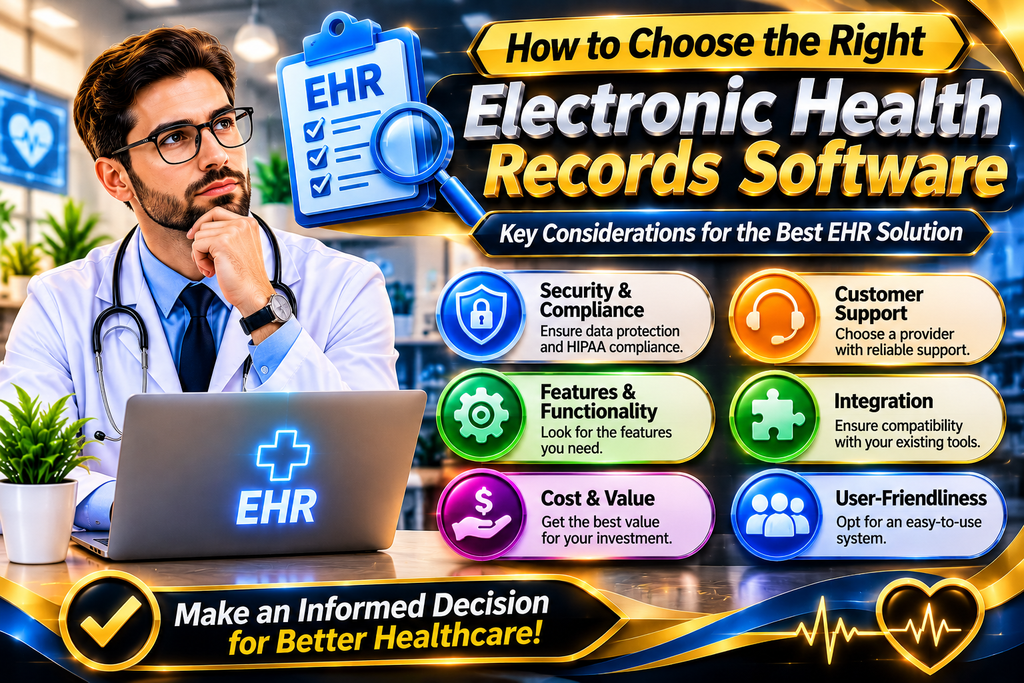
Choosing suitable EHR software requires careful planning. A system that works well for a small medical practice may not be appropriate for a large hospital.
Before purchasing a solution, healthcare organizations should evaluate their workflows, technical requirements, budget, and future plans.
Identify Your Healthcare Requirements
Start by identifying the main problems you want the software to solve.
For example, a private clinic may prioritize appointment scheduling and clinical documentation, while a hospital may need advanced department integration and inpatient management.
Prepare a list of essential features before comparing available platforms.
Evaluate Ease of Use
Healthcare professionals already manage demanding responsibilities.
A complicated interface can make documentation more difficult and increase the time required to complete routine tasks.
Request a demonstration or trial version to evaluate navigation, documentation workflows, and overall usability.
Check Integration Capabilities
Review whether the software can connect with other systems used by your organization.
Possible integrations include:
- Laboratory information systems
- Pharmacy systems
- Medical imaging platforms
- Billing applications
- Appointment management tools
- Patient portals
Confirm that the integrations you need are actually supported.
Review Security Features
Examine the vendor’s security documentation and available safeguards.
Ask about encryption, authentication, access controls, audit logs, backups, and incident response procedures.
For organizations subject to specific regulations, obtain appropriate evidence of the vendor’s compliance responsibilities and contractual commitments.
Understand the Total Cost
Software pricing may include more than an initial subscription or purchase fee.
Consider additional expenses such as:
- Implementation
- Data migration
- Staff training
- Technical support
- Customization
- Integration
- Maintenance
- Additional user licenses
Comparing the total expected cost can help avoid unexpected expenses.
Consider Scalability
A healthcare organization may expand its services or add new locations over time.
Choose a platform that can accommodate expected growth without requiring an immediate replacement.
Plan Implementation and Staff Training
Successful implementation involves more than installing software.
Healthcare organizations should prepare a migration plan, assign responsibilities, train employees, test important workflows, and establish technical support arrangements.
Before switching completely from an existing system, verify that patient information has been transferred accurately and that essential functions are working properly.
Conclusion
Electronic health records software has become an important technology for managing patient information in modern healthcare environments. It helps healthcare organizations move beyond traditional paper documentation by providing digital tools for recording, organizing, retrieving, and exchanging medical information.
From patient management and electronic prescriptions to clinical documentation and reporting, these platforms offer several features that can support healthcare professionals in their daily activities.
However, choosing the right solution requires careful consideration of security, privacy, interoperability, usability, cost, and organizational requirements.
Healthcare providers should evaluate different platforms, request demonstrations, compare available features, and prepare a proper implementation plan before making a final decision.
Frequently Asked Questions About Electronic Health Records Software
1. What is electronic health records software?
Electronic health records software is a digital system used by healthcare organizations to create, store, manage, and retrieve patient medical information. It supports clinical documentation and authorized information sharing.
2. What is the difference between EHR and EMR software?
EMR software generally manages digital patient charts within an individual medical practice or healthcare organization. EHR software is designed to support a broader patient health record and information exchange across different healthcare providers.
3. Who uses electronic health records software?
Hospitals, private clinics, doctors, specialists, nursing facilities, and other healthcare organizations use EHR software to manage patient information and support medical operations.
4. What are the main features of EHR software?
Common features include patient management, clinical documentation, appointment scheduling, electronic prescriptions, laboratory result management, billing, patient portals, and reporting tools.
5. Is cloud-based EHR software safe?
Cloud-based EHR software can provide strong security when supported by appropriate encryption, access controls, authentication, backups, and security management. Organizations should evaluate the vendor’s safeguards before adopting a solution.
6. How does EHR software improve patient care?
EHR systems can help healthcare professionals access relevant medical histories, review available test results, coordinate with other providers, and maintain organized treatment documentation. They support clinical work but do not guarantee better outcomes by themselves.
7. How much does electronic health records software cost?
The cost depends on the software provider, number of users, selected features, hosting arrangements, implementation requirements, and support services. Organizations should compare total ownership costs rather than looking only at subscription prices.
8. Can small medical practices use EHR software?
Yes. Many EHR solutions are designed for small practices and independent healthcare providers. These systems may offer essential functions such as patient registration, appointment management, clinical notes, and prescriptions.
9. What should healthcare providers consider before choosing EHR software?
Important considerations include ease of use, security, privacy requirements, interoperability, essential features, integration options, total cost, scalability, and technical support.
10. Can electronic health records software integrate with other healthcare systems?
Yes. Many EHR platforms support integrations with laboratories, pharmacies, billing applications, imaging systems, and other healthcare technologies. Available integrations depend on the software and supported technical standards.